● Free NMS Tool · Windows

See your whole network live, on one screen.

GET IT NMS monitors every switch, firewall, Wi-Fi controller, access point, server, CCTV and printer – with auto topology, smart alarms, bandwidth & application reports and a complete asset register. Install in 10 minutes on any Windows PC.

Free 30-day full trial · No credit card · Windows 10 / 11 / Server 2016+ · Made in Lucknow, India
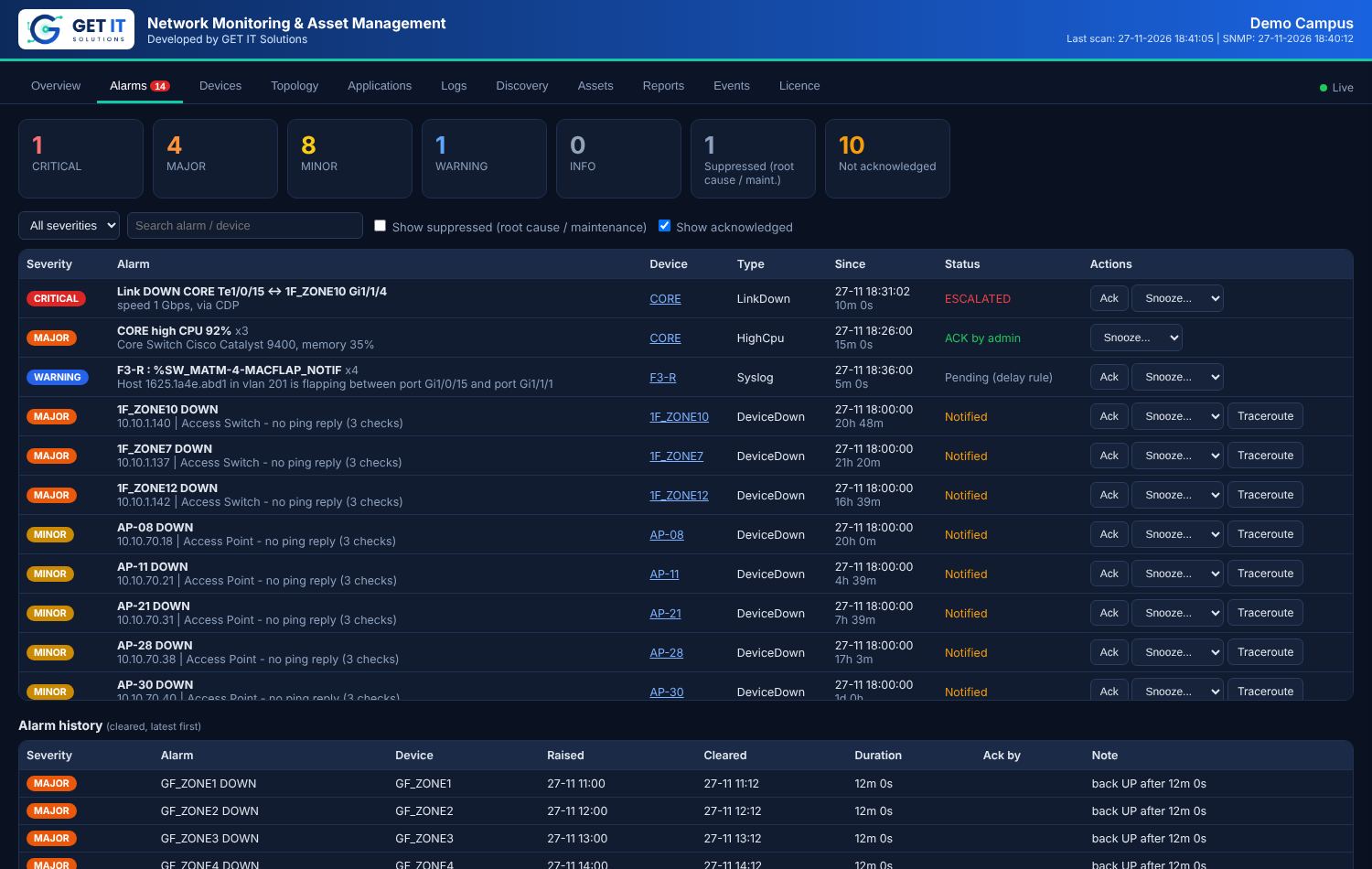
Alarms
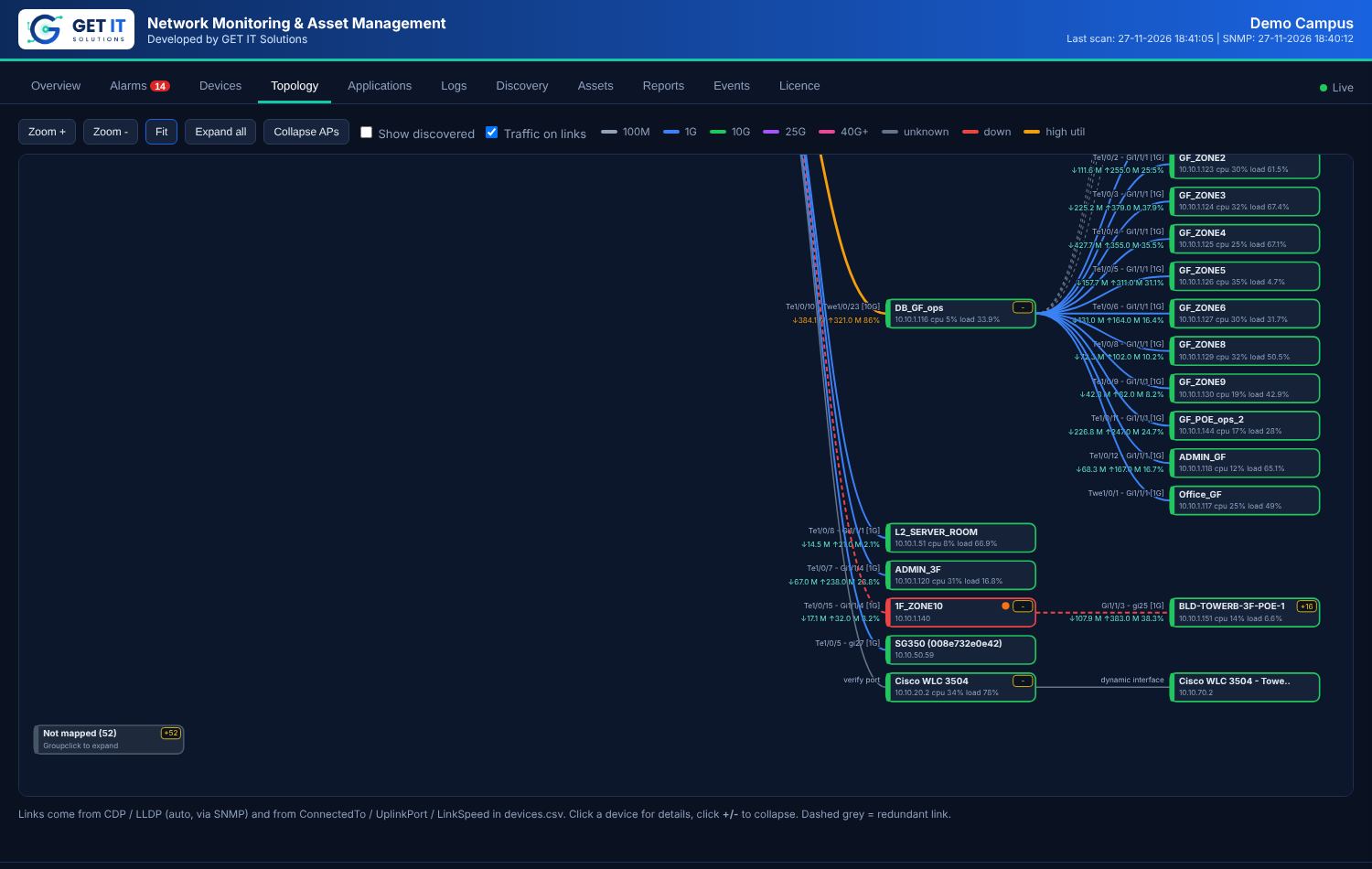
Topology
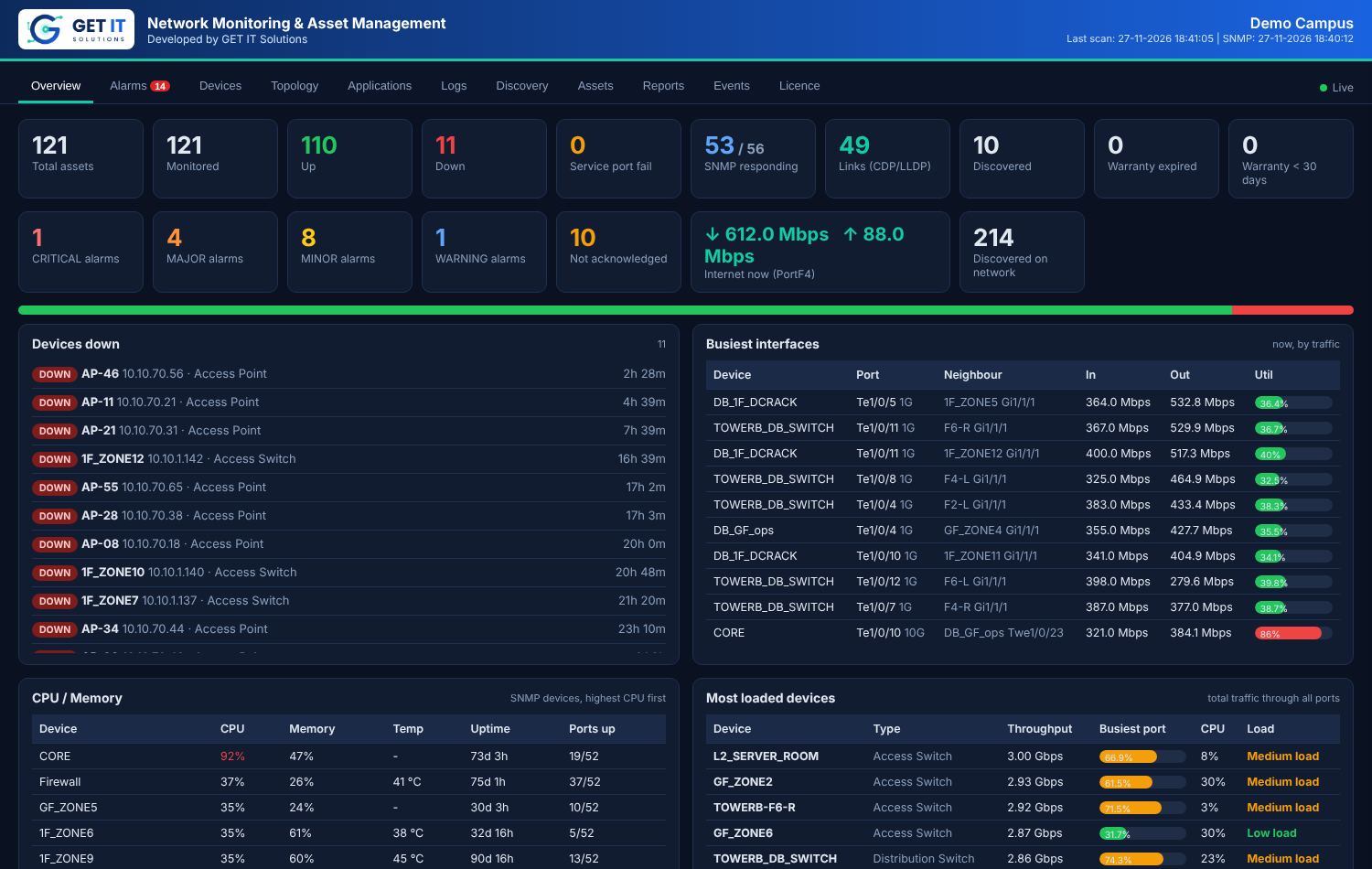
GET IT NMS live dashboard
0 devices down
⚡ 612 Mbps live
Ping + SNMPevery 60 seconds
CDP / LLDPauto topology map
Syslog + NetFlowapps, users, sites
0 cloudyour data stays on your PC
100% customfeatures added on demand

Everything an enterprise NMS does

Built for colleges, offices, hospitals and government sites – works with Cisco, Sophos, Fortinet, HPE Aruba, Juniper, MikroTik, Ruckus, D-Link, TP-Link, Hikvision and more.

Live monitoring

Up/down, response time, CPU, memory, temperature, uptime and every port of switches, firewalls, WLC, APs and servers.

Auto topology

Map drawn automatically from CDP / LLDP with 1G / 10G links, live traffic on every link and down links in red.

Smart alarms

Critical / Major / Minor alarms with root-cause suppression, acknowledge, snooze, escalation and alerts by e-mail, Telegram or webhook.

Bandwidth & applications

Firewall syslog and NetFlow show internet usage, top applications, top users and websites – live and for 7 days.

Asset & warranty register

Model, serial, firmware, MAC and vendor collected automatically. Add purchase, warranty, licence and AMC dates – get alerts before they end.

Network discovery

Scans your subnets and finds switches, APs, CCTV cameras, printers, PCs and UPS – add them to monitoring with one click.

Reports & logs

Availability, uptime and alarm history reports, central syslog for Cisco, Sophos and Fortinet, CSV export for audits.

Secure & on-premise

Runs on your own Windows PC – no cloud. Admin / viewer users, hashed passwords, IP allow-list and login lockout.

Signed updates

New features arrive as GET IT-signed updates – one click online, or by pen drive for air-gapped sites. Backup and rollback built in.

How GET IT NMS works

One Windows PC on your LAN talks to every device – it polls them, listens to their logs and alerts your team the moment something breaks.

Internet Firewall Core switch Building A Data centre Building B Wi-Fi AP CCTV Servers Printer Wi-Fi AP ✕Switch down GET IT NMS Windows PC · :8080 Ping + SNMP polls Syslog + NetFlow in ● MAJOR alarm Building B switch DOWN 2 APs behind it suppressed (root cause) → e-mail · Telegram · webhook
10G link1G linklink downNMS pollinglogs & flows to NMS

Poll

Every 60 s NMS pings each device and reads CPU, memory, ports and neighbours over SNMP.

Listen

Switches and firewalls send syslog and NetFlow – NMS turns them into alarms, applications and user reports.

Correlate

When an uplink fails, NMS raises one root-cause alarm and quietly suppresses the devices behind it.

Alert

Your team gets e-mail / Telegram in seconds and sees the exact port on the live topology map.

Take a look inside

Real screens from GET IT NMS (demo data). Click a picture to enlarge.

GET IT NMS screen

Overview – devices down, busiest links, CPU / memory and live internet bandwidth.

Up and running in 10 minutes

No database, no server licences, no extra software – just a Windows PC on your LAN.

Download

Click Download for Windows and extract the zip on the PC that will run the NMS (24×7 PC or server recommended).

Install

Double-click Setup.bat. The wizard checks the PC, finds your network and installs NMS as a Windows service.

Start free trial

On the activation screen choose Free 30-day trial and enter your organisation, e-mail and phone.

Monitor

Open http://<PC-IP>:8080, add your devices or run discovery, switch on SNMP – done.

Works with your devices

Cisco Catalyst & NexusCisco WLC / APsCisco CBS / SGSophos Firewall & APsFortinet FortiGateHPE ArubaJuniperMikroTikRuckusQuantum NetworksD-Link / TP-LinkHikvision / Dahua CCTVWindows & Linux serversPrinters & UPSAny SNMP v2c device

System requirements

  • Windows 10 / 11 Pro or Windows Server 2016 / 2019 / 2022
  • 4 GB RAM (8 GB for 500+ devices), 10 GB free disk
  • PowerShell 5.1 (already in Windows) – nothing else to install
  • LAN access to your devices; internet only for activation & updates

Trial & licence

  • 30 days free with every feature, up to 50 devices
  • Then a yearly licence from Get IT Solutions – online or offline (air-gapped)
  • Installation, SNMP configuration and training by our engineers
  • Your data never leaves your network

Download GET IT NMS – free

Full version, 30-day free trial. Includes the step-by-step user manual. Need help installing? Our engineers will set it up for you.

Download for Windows User manual (PDF) Version 3.3 · Windows 10 / 11 / Server · about 2 MB, manual included
100% customisable

Built around your network – not the other way round

Your requirement, your NMS – tell us what you need and we build it for you.

GET IT NMS is developed in-house by Get IT Solutions, Lucknow. Need something it doesn't do yet? Tell us – our team adds features on demand and ships them to you as a signed update.

Your brandingYour logo, name and colours on the dashboard and reports
Any deviceNew vendors, models, sensors, UPS, PDUs, cameras, IoT
Custom reportsManagement, audit, SLA and GeM / tender formats – PDF or Excel
IntegrationsSMS, WhatsApp, ticketing, ERP, Active Directory, APIs
Dashboards & NOC viewVideo-wall screens, floor maps, building views
WorkflowsEscalation rules, shifts, approvals, config backup & policies

Request a feature / share feedback

We reply within one working day.

Questions

Is it really free?

Yes – the trial is the full product with every feature for 30 days and up to 50 devices. After that you can buy a yearly licence from Get IT Solutions; your settings and devices stay as they are.

Does it need the internet or a cloud account?

No cloud. NMS runs on your own PC and your monitoring data stays there. Internet is used only to activate the licence, check it every 30 days and download updates. Air-gapped sites get an offline licence key.

Which devices can it monitor?

Anything that answers ping, and full details (CPU, memory, ports, traffic, model, serial) from any SNMP v2c device – Cisco, Sophos, Fortinet, HPE Aruba, Juniper, MikroTik, CCTV, servers, printers and UPS.

Is Linux or Mac supported?

The NMS server runs on Windows. You can open the dashboard from any browser – Windows, Mac, Linux or mobile.

Windows Defender / antivirus warns about the setup?

The setup is a PowerShell installer. Download it only from getitsolutions.in. If your antivirus blocks it, contact us and we will help you install.

Can you add a feature only for us?

Yes. GET IT NMS is our own product, so it is fully customisable – your branding, new device types, custom reports, SMS / WhatsApp alerts, integrations and dashboards. Use the feature request form or call +91 82990 87647.

Can Get IT Solutions install it for us?

Yes. Our engineers install NMS, configure SNMP / syslog on your switches and firewall, and train your team. Call or WhatsApp us from the contact page.